-
Glitch task 1 – Permalinks and Azure Custom Domain for Word Press
So here is a thing… with Azure one can have a custom domain attached to a App Service where one’s Word Press is hosted.
It’s very straight forward on how to do this for your App Service. And indeed for a domain that one owns this is simple to setup. Azure creates a CNAME and TXT dns records for one to push forward a domain or sub-domain to the Azure App Service (you know that horrible url that ends with “azurewebsites.net”). And this all works…. mostly.
It would appear initially that Permalinks can not be updated to point to the subdomain…

Yes that thing in the WP general settings… So how does on fix that? Well I dropped into the ssh dev tool on the site… This is located on the App Service here:
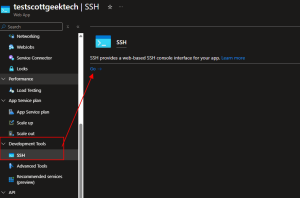
Push “go” – you may need to respond to a credential request… ***Warning THE SSH WILL PUT YOU IN THE CONTAINER AS ROOT!! yeah… be careful here.
Next, we is word press…. it’s here /var/www/wordpress. And if you think we are going to modify wp-config.php then yes we are. I suggest you cp a copy to a .bak file.
I cd’ed into the path /var/www/wordpress:
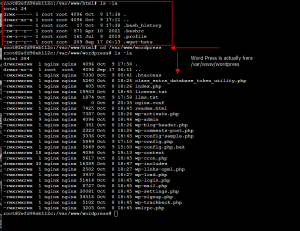
nano the file… nano wp-config.php ( you did do a cp wp-config.php wp-config.php.bak right?)
Next a couple of steps:
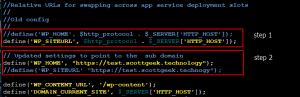
Step 1 comment out the ‘WP_HOME’ line (this is really all one needs to do… leave the WP_SITEURL the same)
Step 2 add a new line setting the ‘WP_HOME’ to the custom domain. ***you must have already set up a custom domain in Azure before you update the config file. If you don’t, yes your site will break!***Save the file and re-enter your Dash Board in Word Press… You may have to restart the app and wait for the update to occur. But this should fix the peralinks.
~SG