-
Glitch task 1 – Permalinks and Azure Custom Domain for Word Press
So here is a thing… with Azure one can have a custom domain attached to a App Service where one’s Word Press is hosted.
It’s very straight forward on how to do this for your App Service. And indeed for a domain that one owns this is simple to setup. Azure creates a CNAME and TXT dns records for one to push forward a domain or sub-domain to the Azure App Service (you know that horrible url that ends with “azurewebsites.net”). And this all works…. mostly.
It would appear initially that Permalinks can not be updated to point to the subdomain…

Yes that thing in the WP general settings… So how does on fix that? Well I dropped into the ssh dev tool on the site… This is located on the App Service here:
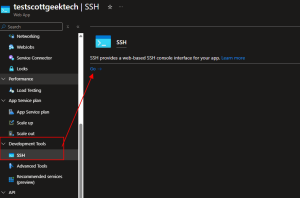
Push “go” – you may need to respond to a credential request… ***Warning THE SSH WILL PUT YOU IN THE CONTAINER AS ROOT!! yeah… be careful here.
Next, we is word press…. it’s here /var/www/wordpress. And if you think we are going to modify wp-config.php then yes we are. I suggest you cp a copy to a .bak file.
I cd’ed into the path /var/www/wordpress:
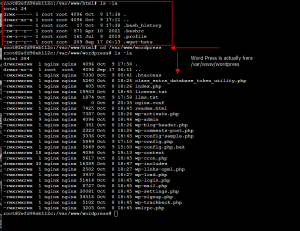
nano the file… nano wp-config.php ( you did do a cp wp-config.php wp-config.php.bak right?)
Next a couple of steps:
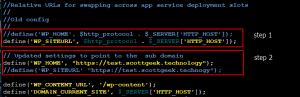
Step 1 comment out the ‘WP_HOME’ line (this is really all one needs to do… leave the WP_SITEURL the same)
Step 2 add a new line setting the ‘WP_HOME’ to the custom domain. ***you must have already set up a custom domain in Azure before you update the config file. If you don’t, yes your site will break!***Save the file and re-enter your Dash Board in Word Press… You may have to restart the app and wait for the update to occur. But this should fix the peralinks.
~SG
-
Azure here we come with WordPress
Ok, what the hell is Azure ScottGeek Technology thing at test.scottgeek.technology? Well, after the massive down on my servers… and after the re-build(that is always fun), it is now time for me to finally use all of that Cloud knowledge to use. The test site (this site actually) is hosted on Azure. Yes one can do WordPress on Azure.
I will be doing some testing here before I move and go the main site. This is the first step into the cloud with a site container with a WordPress site deployed. As it turns out doing this in Azure is very simple…. Now cloning my site from one host to another that was interesting. So Far the only issue was between Azure site caching with a WP Cache plugin- the plugin did not win that battle. Deactivating the cache plugin was the fix.
So that is the first step… more to come.
~SG
-
The Massive Server down thing
Yes yes – my site has been “off-line” Seems the massive proxmox server developed a … we will call it “hardware issue”? Well as I try to find a good backup of my VM… here we are.
Looks like I will need to re-build the “massive”- as proxmox seems to have “eaten” itself… Yeap, not a hardware— it’s something else! Oh how I do live linux…
~SG
-
Plex Install on Raspberry PI 5
On a trip to update my Plex Server… I want to move it to the new Raspberry PI 5… What could go wrong?
Ok, here we go…
The assumption to start with is that you have your Raspberry setup and are at a terminal/ssh window (there are lots of step by step instructions on the web to get you there). Needless to say, you need the hardware and os setup before you start here.
Step 1. Make sure your raspberry is up to date with the sudo apt update/upgrade (apt-get is shown here)
sudo apt-get update
sudo apt-get upgrade
Step 2. You have to have the https protocol available on the PI (if it’s not already there). Install the package.
sudo apt-get install apt-transport-https
Step 3. Now the fun part. This step is about making sure that the Plex repository is available to the atp command for installing. This step is to put the signed key, for the repository, onto your PI’s keyring. This ensures that what you are installing is legit.
***Now many step throughs on the web have not updated this part, depending on what version of Debian/PI you have, you may see an error about a keyring command being deprecated. Trust me, if you get that error with the keyring step, using those an older ‘How to install plex for the PI’, you guess it… Plex will not install. I want to point out this whole step through assumes a reasonable latest Debian and a PI 5 (at the time of this post). Anything other than that, your milage may vary!
Ok onto it. Let’s get that signed key in place so we can add the Plex repository:
curl https://downloads.plex.tv/plex-keys/PlexSign.key | gpg --dearmor | sudo tee /usr/share/keyrings/plex-archive-keyring.gpg >/dev/null
Step 4. Now that the Plex GPG key is installed, we need to add the official plex repository.
echo deb [signed-by=/usr/share/keyrings/plex-archive-keyring.gpg] https://downloads.plex.tv/repo/deb public main | sudo tee /etc/apt/sources.list.d/plexmediaserver.list
Keep in mind that we have not actually installed Plex just yet. Steps 1-4 are about getting the PI ready.
Step 5. And just when you thought we were done with “step up”. Nope, one more housekeeping thing to do. We have to actually update to refresh the package list. This time the Plex repo is available. This of course is done with apt update:
sudo apt-get update
Step 6. Finally we are ready to install Plex with a apt install:
sudo apt install plexmediaserver
The install does a number of things. It creates a “plex” user and group. It should set up two directories- one where to store files temporarily that Plex is transcoding. You can find this folder at “
/var/lib/plexmediaserver/tmp_transcoding“.The second directory is where Plex will store all the metadata it retrieves for your media. This folder can be found at “
/var/lib/plexmediaserver/Library/Application Support“I found that I had to set these up for myself and make sure that “plex” was the owner with a “sudo chown”, and once installed, that Plex was using those paths. Again your milage may vary depending on how you have your PI filesystems set up.
At this point, you should have a Plex server available at it’s favorite http port.. Something like this:
http://<your PI ip Address>:32400/web
Some other tips about your newly formed Plex server…
I would make sure that the IP address to your PI is static (lots of places on the web with “how tos” down that rabbit hole).
That your router allows port 32400 to this PI to be available (useful if you want devices other than your browser to have access).
I would also, for the Raspberry PI 5, take advantage of the PI 5’s pcie port (hey it’s new! It’s faster! Why not?)For my Plex move to the PI5, I have a 2Tb WD Blue SN580 NVMe attached to a PI 5 pcie hat/shield and a WD Blue SSD attached to the usb port. My PI 5 boots off the NVMe and Plex runs from that filesystem. I have libraries on both the NVMe and the SSD for Plex. And finally, I have Samba shares to the Plex library folders.
All in all, it is definitely a step up from my Raspberry PI 4b! Now all’s that is left for me to do is…. move over my massive library of TV and Movies… Oh Bother!
Happy Plex’ng
~SG -
“OPS” in the life of a Tech Geek.
Indeed, system operations (a.k.a. a typeof(OPS)), seems to consume time and effort no matter how much one thinks one has it right. Don’t get me wrong, I’m far from being the absolute know-it-all, but I do try to get most things correct- well at least in the 1st 5 tries.
So, System OPS… what’s up, or sometimes down?
I’ve been on a path to stop using my “heavy iron” (also known as the enterprise rack servers I have in my home lab) as a single server with a single OS installed. Instead I’m going down the path of doing VM servers (Linux or Windows) hosted on a Proxmox platform.
For the most part I’ve moved away from VMWare and opted for Proxmox. This choice was based on the fact that I use Open Source or Freely available editions of these platforms, and I find that Proxmox offers a better usage of my “heavy iron”. The free license of VMWare will not scale the number of CPU’s beyond a certain point. I’m not complaining about that, it’s just how VMWare does their product. It’s a limitation based on them wanting one to buy an enterprise license. Again, not a complaint. VMWare is just not for me.
Proxmox, yes I had to learn an entirely new platform. The journey has not been to bad as I already have a good foundation with VM’s based on my VMWare and Azure experience. Not even the fact that Proxmox operates on a Linux base OS proves to be much of a challenge. After all, I do have extensive experience with Linux things (my office is littered with Raspberry PI’s, and I come from a modest background of being exposed HP Unix).
The main hurdle I’ve come across with Proxmox on my “heavy iron” is the disk setup. When one installs Proxmox, it is very clear that for file systems like ZFS, there is no support for Hardware based Raids. Well that poses a problem with my older servers that generally require that any and all disk drives be configured through the hardware raid controller. The older servers (HP DL380 Gen 8 and older) generally do not expose the hard drives to an OS unless a logic drive it setup first. This is not so much a problem with HP DL380 Gen 9 and above, because the typical raid controllers installed have an option call “HBA”- HBA is simply a pass-thru mode for the disk drives.
With my older servers, without HBA, I’ve gone to a RAID 0 config (which is a simple stripped single drive). So far Proxmox has not had any issues with that. But I think for these, I’ll try to find a HBA controller that I can swap out for before push any major VM’s onto those older servers, or add them as a storage cluster. The main loss with this type of setup, that is not pass-thru, is that one loses S.M.A.R.T drive functions. That can be a thing if one wants to see failing drives stats in Proxmox, or wear stats for SSD’s. One will not see this for these types of drives.
Now onto the path of pain… Before I stopped ignoring the warnings from Proxmox about using ZFS on a Hardware Raid, indeed YES my ZPOOLS on the ZFS storage went “belly up” and took my VM’s with them… The WOES of OPS. I spend hours and hours getting those VM’s ready and enabled to host of all things… Word Press Web sites… oh like the one you are reading from!!! EPIC in the levels of failure… Computers make one humble at times. 😆
Lessons learnt… read extra carefully the warnings about Proxmox not supporting Hardware Raids for file systems like ZFS where one has one’s VM drives on that type of file system. Make sure one makes image backup of those VM drives at every major step in setting up a complex server VM.
In the end, one learns by such things. I know far more about setting up a Word Press site on IIS from scratch than I ever wanted to… And on a positive note, I’m getting really good at Proxmox…
Now back to our regularly scheduled program…
~SG
-
New Year New Server
Yes indeed, a new year… and where have all the tech posts ? Let’s see, been way too busy moving, holidays, fixing and messing up my servers and my web sites and …
The short of it… my old web servers were slight damaged in the move… go figure. And it did take a bit getting all of that setup in the new lab.
Other changes:
Moved off of Go Daddy- the nickel and dime me got old. Moved to another registrar.
VM’ed my web servers- yes it’s time to move off the old servers and into the modern world. So obliviously we’re on bigger newer faster servers.
And as I rebuilt the sites, these were also moved to newer OS, etc etc.So yes, been busy getting the infrastructure back up and going..
Happy New Year!
A follow up- My KVM decided I did not fully understand that I need to use HBA configurated drives with using the ZFS file system. Needless to say, we had a power fail (I’ve since replace the failing UPS), and as a result the VM main drive decided to corrupt itself… and of course as I started to re-build the entire VM… one discovered that my only full Image of the VM was last done in November last year…. Good Grief….
So we are mostly back up… I’ve still two sites to go….
~SG
-
Visual Studio and that Annoying Code Style
Here were are long ago from my last post and what do I do? Yes, complain about Visual Studio 2022 and MS removing yet again the only real coding style I… use?
Yes, that thing one does when one creates a Constructor for a Class to set a private read only variable that is not “this.whatever” but using the camel case “_whatever”.
Now I get it… it’s a style… not everyone like the _whatever variables when one does something like Dependency Injection… Ok I have no problem with that…The complaint here… is everything almost when MS releases yet another update to VS 2022- they reset my code style! Really!
Anyway… a good post to explain how to put it back:
-
I’m back! Well mostly…
ScottGeek
-
Happy Holidays to Everyone
It’s been a very season the last couple of months… and I’ve not been able to get back to blogging like I’ve wanted to…
So now, I’ve got a crap load of topics I want to write about… Indeed yes. Time to spend a few hours a day getting my list up and going.
~SG
-
Behind on posting, Yes I know
So, yes I’ve not been posting as much. It’s been a very busy time with doing some Raspberry PI things… teeth problems… you know the normal stuff where posting kind of falls off a bit. Oh, yeah… I’ve also been working at moving over one of my sites to Blazor (that should be interesting considering how mush I dislike CSS).
Ok, I’ll be back soon..
~SG